


Meal Planner - Weekly Plan
4.8393.00 Reviews
App Specs
- Version
- 1.2.3
- Updated On
- License
- Free
- Downloads
- 500,000+
- Developer
- youmealplan.com
- Categories
- Food & Drink
- Platform
- Android, iOS
Screenshots
 Analysis by AppCompare
I usually judge a meal planner by what happens on a busy weekday, not by how many recipes it can show me. The useful question is whether I can choose a few dinners before the week starts and avoid making another last-minute trip to the shop. Meal Planner - Weekly Plan is aimed at that practical routine: it brings a weekly plan, recipes and a shopping list together in one place. That makes it worth a look if deciding what to cook is more tiring than the cooking itself.
This is a Food & Drink app from youmealplan.com, and it has a 4.8 average from around 17 thousand ratings. It is free to install, with optional in-app purchases ranging from $3.49 to $10.99 per item. It is rated for Everyone, so the intended audience is broad, though the best fit is someone who wants help organizing meals rather than a specialist nutrition or calorie-tracking tool. The app has passed 500 thousand installs, and its current version is 1.2.2.
How the weekly routine holds up
I find the weekly routine most useful when it stays flexible: a few planned dinners can make shopping and weekday decisions easier without turning every evening into an obligation. In the next section, I’ll focus on how that balance affects the app’s day-to-day usefulness, especially when plans or appetites change. A plan works best as a guide, not a promise.
A straightforward starting point, with a useful trade-off
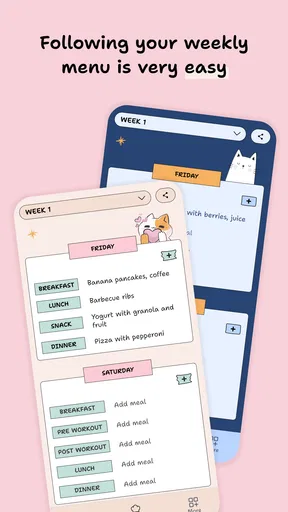
When I first opened Meal Planner - Weekly Plan, I was greeted with a clean, intuitive interface. It didn’t take long to figure out where everything was, which is a huge plus in my book. The app offers a simple onboarding process that walks you through setting up your first weekly meal plan. You can either start from scratch or use one of the pre-made templates. I opted for a template because, let's be honest, sometimes you just want someone to do the thinking for you.
Templates are most helpful when I treat them as a first draft, not a strict menu. A plan can look tidy on screen and still fail in real life if two dinners call for the same limited evening time or if a dish depends on an ingredient I rarely keep at home. I would scan the week before shopping, move or replace anything that clashes with my schedule, and only then rely on the list. That small review turns a generic plan into something I can actually follow.
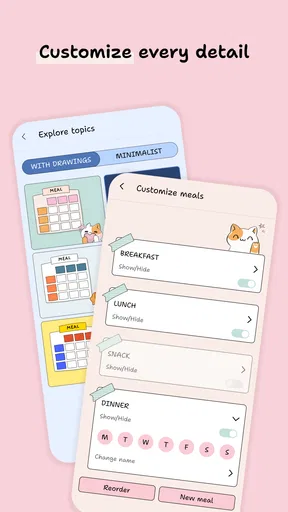
Starting from scratch makes more sense when I already know which meals are realistic for the coming days. For example, I might leave one evening flexible for leftovers and plan a more involved recipe for a night when I have time. A template is better when I’m short on ideas; a blank plan is better when I already have a rhythm. The app’s value is not in making every decision for me, but in giving those decisions a place to live.
Personalizing meals without over-planning
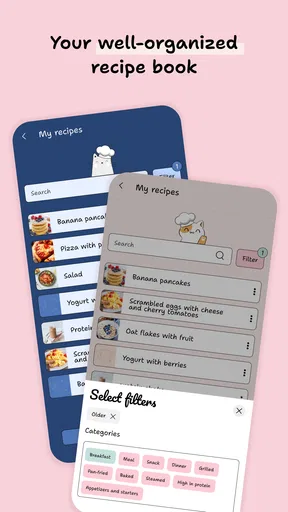
One of the best features I found is the app’s flexibility when it comes to customization. You can adjust meal plans based on dietary preferences, which is fantastic for anyone with specific nutritional needs. Whether you're vegan, keto, or gluten-free, this app has got your back. I tried switching up a few meals to see how it handled substitutions, and it was a breeze. You just click on the meal you want to change, and a bunch of alternative recipes pop up. Super handy!
Worth Reading Before You Choose

Flipboard Shows What News Apps Must Do Beyond the Feed

Switching to Android Auto Means Rethinking Your Driving Routine

Google Calendar Makes a Crowded Week Easier to Manage

Ludo King Makes the Most of the Minutes Between Plans

Baby Panda World Brings Quick Play to Modern Phones, but Its Game Library Feels Busy

ESPN’s Live Game View Makes Following Close Games Easier
I’d still check each recipe myself if a dietary restriction is medically important. A preference setting can make browsing more convenient, but it is not a substitute for checking ingredients, labels or cross-contamination risks. That is especially relevant when cooking for someone else: a quick glance at the recipe before it goes onto the family plan is a sensible habit, even when the chosen preference seems to match.
For a household with different tastes, swapping one unpopular dinner is often more practical than trying to build a perfect menu that pleases everyone at once. I’d keep a small mental list of reliable meals and use alternatives to add variety around them. If I’m cooking for one, I’d also think about whether a recipe leaves useful leftovers; otherwise a varied plan can accidentally mean buying more ingredients than I can use. This is a planner, not a guarantee that every portion or shopping quantity will suit every household.
Making the shopping list work in the real world
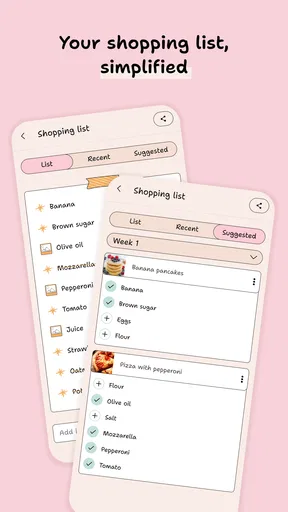
Another standout feature is the automatic grocery list creation. As you add meals to your plan, the app generates a shopping list for you. I loved this because it meant I didn’t have to scramble through my kitchen to see if I had everything I needed. Plus, the list is organized by category, making shopping trips much more efficient. I took my phone to the store, and checking off items felt strangely satisfying.
The best time to use the list is after the menu is settled, not while I’m still experimenting with recipes. I’d first check the pantry for staples and cross off anything already on hand, then group the remaining trip around the store’s layout. That avoids a common planning trap: treating every listed ingredient as something to buy even when it is already in a cupboard. For a shared household, I’d also agree on who is doing the shopping before anyone edits or checks items off, so the list stays useful rather than becoming a second conversation to manage.
A generated list saves the task of copying ingredients by hand, but it cannot decide whether a package size is sensible for my home or whether an ingredient will spoil before I use it. I’d pay particular attention to fresh produce and ingredients that appear in only one planned meal. If the plan includes a bunch of herbs for one dish, for instance, I might choose another recipe that uses them later in the week. That kind of small adjustment is where planning can help reduce waste; simply having a list does not do it automatically.
Recipes, device access and product maturity
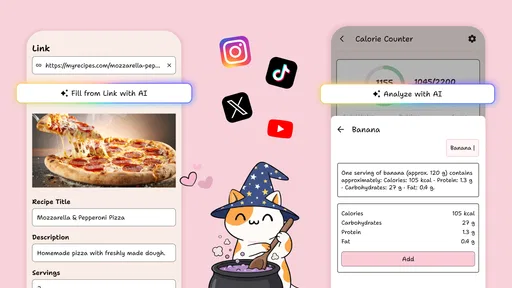
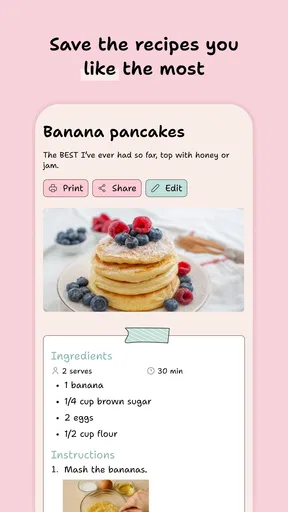
If you're like me and enjoy trying new recipes, you'll appreciate the app’s extensive recipe library. There’s a wide range of cuisines and difficulty levels, so there’s something for everyone. I tried a couple of new dishes and was pleasantly surprised by how delicious they turned out. The step-by-step instructions are easy to follow, and there’s even a timer feature to help you keep track of cooking times.
For a new recipe, I’d read all the steps before starting rather than relying only on the next instruction as I cook. That makes it easier to spot a long preparation step or a point where ingredients need to be ready together. I’d also choose one unfamiliar dish at a time during a busy week. Trying several new recipes can sound exciting when planning, but it leaves less room for the convenience and confidence of familiar meals.
In today’s digital age, having your info accessible anywhere is crucial. Thankfully, Meal Planner - Weekly Plan syncs across all your devices. I tested it out by planning my meals on my tablet and then checking the grocery list on my phone at the supermarket. Everything synced perfectly without a hitch, making the process smooth and seamless.
The app was released on August 12, 2023, and version 1.2.2 is the current point of reference for someone installing it now. That establishes a clear release and version history, but it does not tell me what changed between versions, so I would not assume a particular new feature or redesign. For an existing user, the practical thing to watch is whether the current version continues to make weekly planning, list handling and device access dependable. I’d keep the app updated when a newer release is available, while checking its own update notes for specific changes rather than expecting an update to solve a particular limitation.
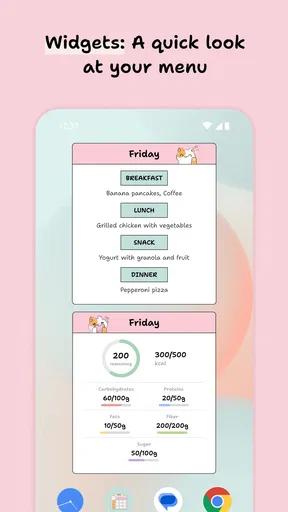
On a normal Sunday, I can imagine opening the planner while checking what is already in the fridge, choosing a few dinners, replacing a recipe that feels too ambitious, and taking the resulting list to the store. Midweek, I can glance at the plan before deciding whether to cook or use leftovers. The benefit is less about a dramatic transformation and more about moving several small decisions out of the hectic end of the day. If I prefer to choose dinner spontaneously, though, a calendar full of planned meals may feel like unnecessary structure.
Where it fits—and where another approach may suit better
Meal Planner - Weekly Plan is more than just a scheduling app; it’s a personal assistant for your kitchen. Whether you’re a seasoned chef or a kitchen novice, this app simplifies the meal planning process, making it less about stress and more about enjoyment. I’ve found myself saving time and reducing food waste, which is a win in my book.
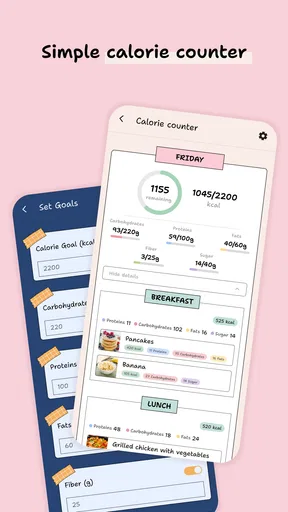
Compared with a notes app or a paper list, the advantage here is the connection between chosen recipes and the shopping list. A notes app is more flexible for people who already have a personal system, but it usually leaves the copying and organizing to them. Compared with a general calendar, this app is more focused on meals and ingredients; a calendar may still be better if the main challenge is coordinating family appointments and meal times in one view. And if I mainly want detailed nutrition tracking, a dedicated nutrition app is likely the more suitable tool. This planner’s strength is organizing what to cook and what to buy, not replacing every kitchen or health app.
I’d recommend it most to people who repeat the “what’s for dinner?” question several times a week, those who like browsing recipes but need help turning ideas into a plan, and households where one person often handles meal decisions and shopping. It is less compelling for someone who cooks from a fixed routine, rarely shops from a list, or dislikes choosing meals ahead of time. The free entry point makes it easy to try the workflow, but because in-app purchases are available, I’d check what an optional item includes before paying rather than assuming every part of the experience is included at no cost.
One useful test during the first week is to plan only the meals I genuinely expect to cook, rather than filling every day for the sake of a complete-looking schedule. I’d leave room for leftovers, a change of plans or an unplanned meal out. Then I’d see whether the generated list made shopping easier and whether I actually cooked the recipes I selected. If the plan feels too rigid, fewer planned dinners may be the better way to use it; if I keep opening the app to make last-minute choices, I may benefit from planning a little further ahead.
For someone deciding whether to install it, the key questions are practical: Can I change a meal when plans shift? The described workflow makes replacing a selected recipe straightforward, which is useful when one dinner stops fitting. Can it help me shop without manually rewriting every ingredient? Its list is built from the plan and grouped by category, though I would still check pantry stock and quantities. Can I use it across devices? The tested tablet-to-phone sync makes that a meaningful convenience when planning at home and shopping elsewhere. Does it make dietary choices safe automatically? I would not rely on a preference alone for medical needs; recipe ingredients still deserve a careful check.
The main remaining trade-off is that convenience depends on keeping the plan realistic. A recipe library can inspire me, but browsing too long can turn planning into another task; a list can organize shopping, but it cannot know my pantry or prevent food waste without my judgment. I’d use the app as a practical organizer and keep my own habits—checking ingredients, allowing flexible nights and choosing sensible portions—part of the process. That balance is what makes a weekly plan useful rather than just attractive on a screen.
If you’re tired of the daily "what’s for dinner?" dilemma, I highly recommend giving Meal Planner - Weekly Plan a try. It’s a small investment for a big payoff in time, money, and peace of mind. So go ahead, download it, and start your culinary adventure today!
Pros
- Easy-to-navigate interface.
- Customizable weekly meal plans.
- Includes grocery list feature.
- Syncs across multiple devices.
- Offers dietary preference filters.
Cons
- Limited recipe variety.
- Requires internet for full access.
- Ads can be intrusive at times.
- Some features locked behind paywall.
- Occasional syncing issues.
FAQs for Meal Planner - Weekly Plan
What features does Meal Planner - Weekly Plan offer?
Meal Planner - Weekly Plan offers a variety of features to streamline meal organization. Users can create weekly meal plans, generate shopping lists based on their plans, and access a wide range of recipes. The app also allows customization to accommodate dietary preferences and restrictions, making it versatile for diverse users.
Is Meal Planner - Weekly Plan suitable for different dietary preferences?
Yes, Meal Planner - Weekly Plan caters to various dietary preferences, including vegetarian, vegan, gluten-free, and keto diets. Users can easily filter recipes and meal suggestions according to their specific dietary needs, ensuring that the app is inclusive and adaptable for everyone.
Does the app offer synchronization across devices?
Meal Planner - Weekly Plan supports synchronization across multiple devices. This means you can access your meal plans, shopping lists, and favorite recipes on your phone, tablet, or computer, ensuring seamless integration and convenience no matter where you are.
Are there any in-app purchases or subscriptions?
While Meal Planner - Weekly Plan offers a free version with essential features, there are optional in-app purchases and subscriptions available. These may include access to premium recipes, advanced planning tools, and ad-free experiences. Users can choose to upgrade according to their needs and preferences.
How user-friendly is Meal Planner - Weekly Plan for beginners?
The app is designed with user-friendliness in mind, making it accessible to beginners. It features an intuitive interface, step-by-step guides, and helpful tips to assist new users in navigating its functionalities. This ensures that even those new to meal planning can start organizing their meals with ease.


